Your practice website, live in minutes.
Choose your web address and a design, describe any change in your own words, and publish. Then run your practice from one place: clients, appointments, sessions, notes and payments.

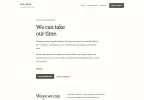
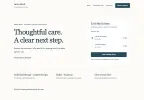
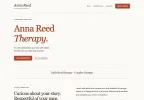


Animation in five steps. 1, choose your web address: Anna Reed types her name, sees annareedtherapy.com is available and adds it. 2, and a design: in her website editor she picks the Quiet Letter design. 3, describe any change: she asks for a short section about how she works with anxiety, sees a preview, applies it and it saves. 4, and publish: she publishes and her site opens at annareedtherapy.com. 5, then run your practice: a new client picks Thursday 15 October at 11:30 am and asks for a free consultation, Anna accepts it in her dashboard, and the client sees Consultation confirmed.
Your own web address in under five minutes: start with yourname.tranqbay.care, get a new one like annareedtherapy.com, or use the one you already have. Websites are on Premium.
Start fresh, or keep the site you have.
Start from one of 11+ designs made for therapy practices, then describe any change in plain words, like a new section or a warmer tone, and AI makes it. More designs are on the way.


Want something made just for you? Talk to our designer about a custom design, built around your practice. You review it and ask for changes before it goes live.
Talk to our designerCopy and paste one line of code into the website you already have, on WordPress, Wix, Squarespace or most website builders. Clients request an appointment, or book and pay, without leaving your site, and everything runs from your TranqBay account.
- Works where your site lives. One line of code on most website builders, or our plugin if you’re on WordPress.
- On the page or behind a button. Show booking where you want it, or open it from a Book button.
- Someone else runs your site? Email them the steps from your dashboard, with your code included.
Clients book you on your terms.
Set your hours, services and fees. Confirm each booking yourself, or let clients book straight away. Times you’re busy in your Google Calendar never show.
Your hours·Your calendar·Your services·Booked, with reminders
Animation: in her dashboard Anna turns Saturday off and Saturday disappears from her booking page. A lunch in her Google Calendar hides 12:30 pm. She adds Couples therapy, 80 minutes, and clients see it with its fee. A returning client books Thursday at 2:00 pm, and reminders are scheduled by themselves.
Individual and couples sessions, each with its own length and fee, and packages of sessions.
Ask new clients to start with a free consultation if you like.
Connect your Google Calendar and times you’re busy there aren’t offered. TranqBay only reads it.
By email to you and your client before every session.
Send intake and consent forms automatically once you confirm a booking.
From their client login or your booking page, at times you’ve opened.
- Your hours and services
- You confirm, or they book
- Never double-booked
- Automatic reminders
- Intake forms, coming soon
- Clients rebook themselves
Private sessions, under your own name.
Video and audio sessions run in the browser at your own web address, end-to-end encrypted. No Zoom links, nothing to install.


AI notes, only if you turn them on·Private and encrypted·Notes written for you·You edit every note
Animation: Anna is in an encrypted video session with Jordan T. at annareedtherapy.com. She starts transcribing; the app asks first and tells the client, and the call shows the session is being transcribed. She leaves the session, and on the session's page her note is written from the session recording. She changes the next session date and saves the note.
End-to-end encrypted. Only you and your client can see or hear the call.
Check your camera, mic and speakers first. Share your screen or blur your background.
Invite others to a session, or meet by audio or in person.
Write from a template, or switch on AI notes for any session. You edit every note.
Paid before the session, not chased after it.
Clients pay before the session, when they book or when you confirm their request, so there are no invoices to send. Your earnings go to your bank.
Paid before the session·Receipts for your client·Earnings in one place·Paid to your bank
Animation: a client pays $120 for a session with Anna before it takes place. After the session the client downloads the receipt. In Anna's Earnings the session clears into her balance, and the payout run pays it to her bank account ending 4821.
Clients pay by card when they book, or once you confirm their request.
Clients download their own receipt after each session.
Earnings from completed sessions are paid out on each payout run. On Premium, withdraw any time.
Earnings, balance and payouts in one place.
Your whole practice in one place. And a portal for your clients.
One dashboard for your clients, calendar, notes, messages and earnings. Your clients sign in at your own web address, under your name.

You
- Clients and records. Everyone you see, with their sessions and notes.
- Calendar and appointments. Requests, bookings and your week at a glance.
- Messages and earnings. Talk to clients and see what you have been paid.
Your client
- Their sessions. Join, reschedule or book again.
- Messages with you. In one private thread.
- Receipts and reports. Receipts after each session, and any report you send them.
Built for confidential work.
- Encrypted, in calls and in storage.
Video and audio calls are end-to-end encrypted, and your records are encrypted at rest.
- Secure sign-in for clients.
Clients sign in to see only their own sessions, messages and receipts.
- Private notes.
Clients never see your notes, only what you choose to send them, like a report.
- AI is your choice.
AI notes are off unless you turn them on, session by session.
- No recordings kept.
Session audio isn’t stored, and transcripts are deleted after 30 days.
- Your records go with you.
Print any note or download your reports as PDF.
TranqBay has really supported me in my work by making the behind-the-scenes parts of my practice so much smoother. With less to worry about logistically, I can be more present with my clients and focus on the work that actually matters. The platform feels safe, professional, and thoughtfully designed, which really aligns with how I try to hold space in my sessions.
Two plans for running your own practice.
Professional runs your bookings, sessions and notes, with your booking link. Premium adds your website on your own address, AI session notes and withdrawals whenever you like.
Start in 4 steps
- 1Choose your planProfessional or Premium.
- 2Add services and hoursYour fees, session lengths and the times you work.
- 3Publish your websitePick a design and go live, on Premium.
- 4Share your linkIn your email signature, your profiles or the site you have.
Professional
Most popularYour own practice: booking link, your own clients, note templates.
- Unlimited clients and appointments
- Private booking link
- Advanced session note templates
- Service packages
- Google Calendar integration
- Secure video sessions
- Client messaging
- Manual and bulk client import
Premium
Everything in Professional, plus AI-drafted notes, your own website and withdrawals any time.
- Everything in Professional
- AI-drafted session notes for you to review
- Website publishing
- Withdraw earnings any time
Unlimited clients and appointments · Private booking link · Advanced session note templates · Service packages · Google Calendar integration · Secure video sessions · Client messaging · Manual and bulk client import
Prices in US dollars. Upgrade any time and pay the difference for the rest of the month. Cancel any time; paid features keep working until the end of the period you’ve paid for.
On every plan
- Video, audio and in-person sessions
- End-to-end encrypted video with screen sharing and blur
- Couple, family and group sessions
- Client records, and session notes from SOAP, DAP, BIRP and GIRP templates
- Secure messaging with clients
- Session reminders for you and your clients
- A client login for booking, rescheduling and receipts
- Payments and payouts
Questions therapists ask.
Will my clients see TranqBay anywhere?
Your website, booking pages and client sign-in run at your own web address, with your name and photo. Some emails and receipts still come from TranqBay.
Can I use my own web address?
Yes. Start at yourname.tranqbay.care straight away. On Premium, get a new address like annareedtherapy.com or connect one you already own, and your tranqbay.care address forwards to it so old links keep working. Professional includes your booking page; building and publishing your website is on Premium.
Can I keep my current website?
Yes. Copy and paste one line of code into it, or use our WordPress plugin, and clients request an appointment, or book and pay, without leaving your site.
Who do my clients belong to?
You. Clients you invite stay yours, and they book you through your own booking page.
Can I move my clients over?
Yes. Invite them by email, add their details, or upload a spreadsheet. Nobody gets an email until you choose to invite them.
When do clients pay?
Before the session: when they book, or once you confirm their request. They download their receipt after the session.
How do I get paid?
Earnings from completed sessions go to your bank on each payout run. On Premium, you can also withdraw whenever you like.
Do I have to use AI notes?
No. AI session notes are on Premium and stay off until you turn them on, and you can switch them off for any session. Without them you write notes from a template (SOAP, DAP, BIRP or GIRP), and you can edit every note.
Can I cancel?
Yes, any time. Paid features keep working until the end of the period you’ve paid for.
Something else? Chat with us live, or email our team.
Start your practice website today.
Choose your web address and a design, and publish when you are ready. Your clients, sessions, notes and payments come with it.
Already have a website? Keep it, and run your practice hereAlready with TranqBay? Log in